
Zebra ZT610 Label Printer for Demanding Workflows



What Can We Help You With?
A label printer can quickly become a production bottleneck when it can’t keep up with the line, produce readable barcodes, or withstand demanding operating conditions.
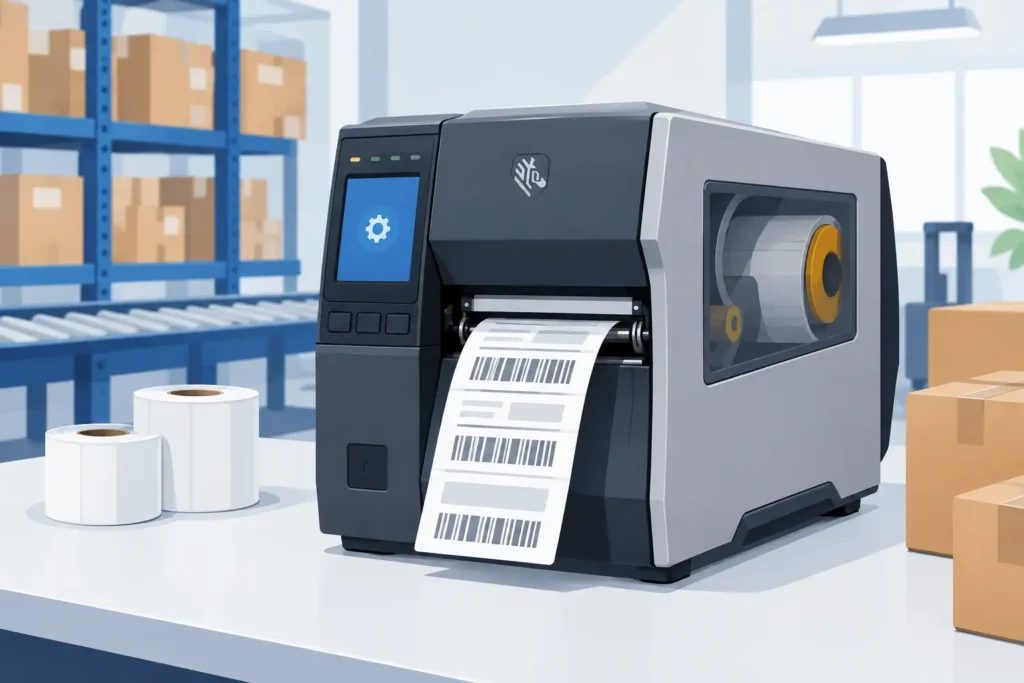
The Zebra ZT610 label printer is designed for operations where reliable label output directly impacts inventory accuracy, shipment flow, compliance, and product traceability. Unlike an office printer adapted for warehouse use, the ZT610 is an industrial printing platform built for high-volume, high-resolution labeling in demanding environments.
For organizations replacing aging equipment, increasing production capacity, or standardizing labeling across multiple facilities, choosing the right printer involves more than comparing hardware specifications. Print resolution, media selection, ribbon performance, connectivity, software integration, and service planning all play a role in determining whether a labeling system will perform reliably day after day.
Where the Zebra ZT610 Label Printer Fits Best
The Zebra ZT610 is a 4-inch industrial thermal transfer printer built for applications that demand durable labels, precise print quality, and consistent output.
It’s particularly well suited for operations that print smaller labels, dense barcodes, detailed product information, or variable data at scale.
Common applications include:
- Work-in-process tracking
- Asset identification
- Electronics labeling
- Pharmaceutical and laboratory labeling
- Retail and compliance labels
- Warehouse bin labels
- Product labels with serialized barcodes
The ZT610’s available print resolutions, including high-resolution options, make it a practical choice when barcode density or small text becomes difficult to produce with lower-resolution industrial printers.
However, not every operation needs this level of printing capability. A facility producing large shipping labels with simple text and standard barcodes may be better served by a less specialized printer.
The ZT610 makes the most sense when fine print detail, duty cycle, and long-term industrial reliability provide real operational value.
Print Resolution Is an Operational Decision
Print resolution is often treated as just another technical specification. In reality, it directly affects barcode scanning performance and overall label usability.
A low-density barcode may print clearly at a standard resolution, but a small 2D barcode, intricate compliance label, or compact electronics label may require more precision.
The ZT610 is available in multiple resolution configurations, allowing buyers to match print quality to their specific label designs. Higher resolution supports sharper small text, finer graphics, and denser barcode symbologies. However, it can also affect print speed and may not be necessary for every application.
A practical selection process should start with the smallest barcode, text size, and label dimensions your operation needs to support. It’s also important to consider the scanners used downstream.
A barcode that looks clear to the human eye can still fail verification or scan inconsistently if the media, ribbon, darkness setting, or printhead resolution isn’t appropriate.
Before standardizing a printer, test representative label formats under actual operating conditions. Include variable data, real barcode content, and the label stock intended for production.
This is especially important for labels that will be scanned after exposure to abrasion, cold storage, chemicals, moisture, or outdoor conditions.
Media and Ribbon Choices Matter as Much as Hardware
Even a high-performance industrial printer can’t deliver dependable results without the right combination of label material, adhesive, ribbon, and print settings.
A capable printer cannot compensate for a label construction that isn’t suited to its intended environment.
For example, a paper label may perform well for short-term carton identification in a dry warehouse. However, it may fail quickly when applied to a reusable tote, metal asset, refrigerated product, or item exposed to solvents.
These applications may require a synthetic facestock, a more aggressive adhesive, and a compatible thermal transfer ribbon.
The same principle applies to print durability.
Wax ribbons are often suitable for coated paper labels and general-purpose applications. Wax-resin and resin ribbons provide greater resistance to smudging, scratching, heat, and chemicals when paired with compatible materials.
The right choice depends on the label substrate and the conditions the printed label will encounter after production.
This is where a complete labeling assessment can help prevent recurring problems. Rather than selecting a printer, labels, and ribbons independently, evaluate them together as one system.
The result can be more dependable print quality, less material waste, fewer reprints, and less unplanned troubleshooting on the production floor.
Integration Should Be Planned Before Installation
The Zebra ZT610 can support networked, USB, serial, and other connectivity requirements depending on the configuration.
For many businesses, however, the bigger question isn’t simply how the printer connects. It’s which system will control the information being sent to it.
Different operations have different labeling requirements:
- A warehouse may print shipping, pallet, and location labels directly from its warehouse management system.
- A manufacturing operation may trigger product or work-order labels through an ERP or manufacturing execution system.
- A laboratory may require controlled templates and serialized information pulled from a database.
Each workflow needs a clear plan for label design, data mapping, printer configuration, and user access.
Poor integration can turn an otherwise capable printer into a source of unnecessary manual work. Employees may have to type information, select the wrong template, print outdated formats, or apply labels inconsistently.
These mistakes can create downstream problems involving receiving, inventory, shipping, traceability, and customer compliance.
A stronger implementation defines label formats, data sources, naming conventions, and print triggers before deployment. It also establishes who is responsible for printer settings and template changes.
For multi-site operations, this level of control helps maintain consistent labeling across locations instead of allowing each facility to develop its own version of the process.
Consider Operator Use on the Floor
Industrial equipment needs to be practical for the people responsible for keeping production moving.
The ZT610 includes a color touch display designed to make configuration and status information easier to manage. However, even user-friendly equipment requires clear operating procedures.
Operators should understand how to:
- Load media and ribbons correctly
- Recognize common printer alerts
- Clean the printhead
- Identify whether a label issue is caused by the media or printer settings
Maintenance teams should also have a planned schedule for cleaning, inspection, and replacement of wear components.
Procurement teams should make sure approved consumables are available before supplies become an emergency order.
These details may seem basic, but they often make the difference between reliable printing and repeated production downtime.
Planning for Service Life and Uptime
The ZT610 is designed for industrial workloads, but like every thermal transfer printer, it contains components that require regular attention.
Printheads wear over time, particularly when abrasive media is used, darkness settings are too high, or routine cleaning is neglected. Rollers, sensors, and mechanical assemblies also benefit from periodic inspection.
A preventive maintenance approach helps protect print quality while keeping costs under control.
Watch for early warning signs such as:
- Fading print
- Voids in barcodes
- Inconsistent print darkness
- Wrinkled ribbon
- Drifting registration
- Repeated sensor errors
Addressing these issues early is usually much easier than waiting for a production-critical failure.
It’s also important to keep the required label and ribbon specifications documented for each application.
Standardizing approved consumables helps prevent well-intentioned substitutions that could cause poor adhesion, barcode failures, excess printhead wear, or ribbon compatibility problems. It also makes reordering and employee training easier.
For organizations operating multiple printers, establishing a replacement plan is better than waiting for equipment to fail.
Consider printer age, print volume, repair history, application changes, and the potential cost of downtime. In high-volume shipping or production areas, keeping a spare printer may be justified when a single device outage could hold up an entire shift.
Questions to Ask Before Choosing a Configuration
Before purchasing a Zebra ZT610 label printer, operations and IT teams should agree on the requirements that matter most to their labeling environment.
Start by considering:
- What is the widest label the operation needs to print?
- What is the smallest barcode or text size required?
- How many labels will be printed each day?
- What print speeds are necessary?
- Which label materials will be used?
- Will labels encounter challenging environmental conditions?
- What connectivity options are required?
- Which software or business systems will generate the labels?
It’s also important to plan for future requirements.
A printer that meets today’s shipping needs may eventually need to support serialized compliance labels, RFID workflows, new customer label formats, or higher-density product identification.
Building some flexibility into the selection process can help prevent a premature equipment replacement.
The right configuration isn’t necessarily the one with the highest specifications. It’s the one that supports the actual label application with enough capacity, print quality, and integration capability to keep operations moving.
Working with an experienced labeling partner like PaladinID can help teams evaluate the printer alongside the labels, ribbons, software, and support processes that determine long-term performance.
A dependable labeling system should make identification work less noticeable—not create more problems to manage.
When the printer, media, data, and maintenance plan work together, labels scan correctly, operators spend less time correcting exceptions, and the operation can focus on moving products instead of managing printer issues.
PaladinID: Make Your Mark.
At PaladinID, we don’t just sell labels—we solve labeling problems. From custom label materials and compatible ribbons to industrial printers and complete labeling solutions, we help businesses find the right combination for their unique applications.
Visit PaladinID.com to explore more of our labeling solutions or contact our team to discuss your printing and labeling needs.


Got Labeling Questions? Our AI Assistant Has Answers - Chat Now!
For more information on PaladinID
Get Help With Your Next Label Project
We have over 35 years of providing exceptional service and labeling products to the world. Take the first step to an easy, stress-free solution for your label needs by contacting us.
Schedule a call below or email [email protected]
Make Your Mark
“Making companies more competitive by offering the correct label printing solution, on time, within budget, while creating unmatched value”.
About PaladinID, LLC
PaladinID develops and supports high-performance barcode labeling applications. We work with our clients to “Make Your Mark” by providing the expertise and tools necessary to create an entire product label printing solution. Located in central New Hampshire, PaladinID has been serving Massachusetts, Vermont, Maine, Connecticut, Rhode Island, New England, and beyond for over 30 years, and in 2017, became an RFID-certified company. We look forward to working with you.
You may be interested in our other services:
Product Labels
Product Labels
Labels for every type of application: Blank, Pre-printed, Variable data
Label Printers
Label Printers
We sell and support: Direct/thermal transfer, Inkjet, Laser
Printer Ribbons
Printer Ribbons
We sell ribbons for ALL barcode printers including: Zebra, Datamax, Sato, Intermec
Flexible Packaging
Flexible Packaging
We offer a wide variety of packaging containers for your products.
Label Software
Label Software
Software for all barcode printing and product labeling.
Label applicators
Label Applicators
Wide selection of applicators: Desktop/Mobile, Applicator only, Print & apply
