
Rental Asset Labeling for Better Equipment Control


What Can We Help You With?
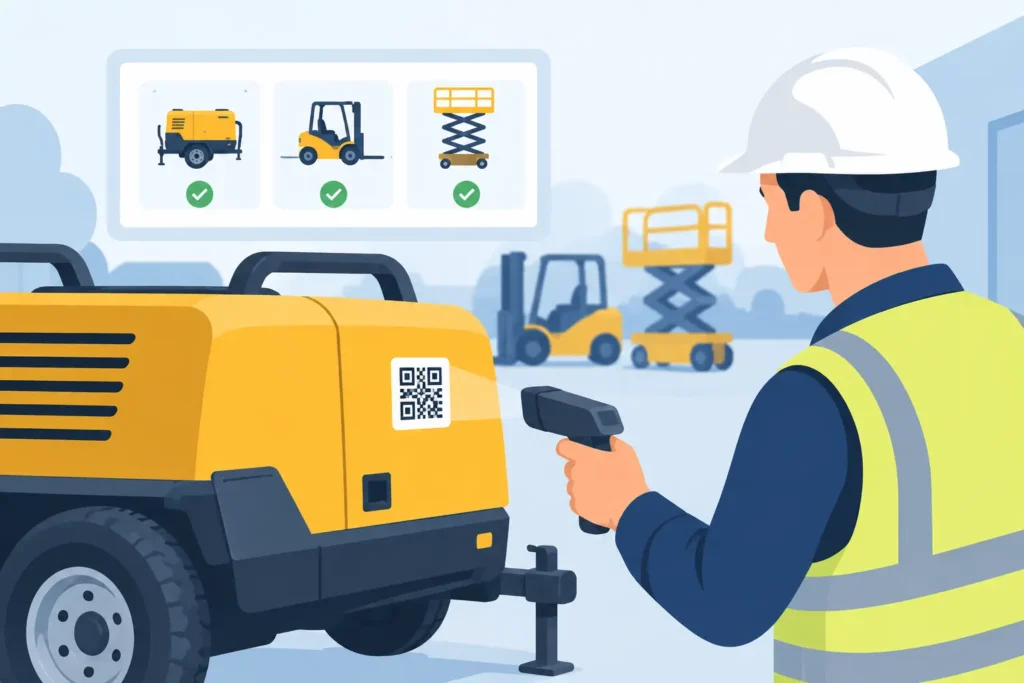
A missing concrete saw, generator, or skid steer is rarely just a replacement-cost problem. It disrupts the next reservation, creates billing disputes, and sends staff searching through a yard or job site instead of serving customers. Rental asset labeling gives every rentable item a durable identity that can be scanned, tracked, and tied to a clear operational record.
For rental businesses, the objective is not simply to place a barcode on equipment. The objective is to create a labeling system that still works after outdoor storage, repeated handling, pressure washing, grease, UV exposure, and frequent check-in/check-out cycles. The right label, printer, barcode format, and asset record must work together.
Why rental asset labeling affects daily operations
Rental inventory moves constantly. A compact tool may be checked out several times a week, while a larger piece of equipment may spend months on a customer site. In both cases, employees need to identify the exact asset quickly, confirm its status, document service history, and assign charges accurately.
A handwritten number or paper tag can work for a small fleet until it cannot. Numbers fade, tags detach, and inconsistent naming makes records difficult to search. When two similar units are identified only by model or description, teams can easily check out one asset while updating the record for another.
A well-designed rental asset label creates a consistent connection between the physical item and its digital record. Scanning can confirm the asset ID at the counter, in the yard, on a delivery truck, or during a field audit. That reduces manual entry and helps staff focus on exceptions rather than routine identification.
Start with the asset and its environment
The best material for rental asset labeling depends on where the asset lives and how it is handled. A label that performs well on a clean indoor tool case may fail quickly on a metal lift, outdoor trailer, or hose-covered machine.
Before selecting a label, evaluate the surface. Painted metal, powder-coated steel, plastic, textured polymer, rubber, wood, and curved surfaces each require different adhesive and material considerations. A label applied over rust, dirt, oil, or an uneven surface may fail regardless of how durable the face stock appears.
Environmental exposure matters just as much. Consider heat and cold cycles, direct sunlight, moisture, chemicals, abrasion, and pressure washing. Equipment used in construction, utilities, landscaping, and industrial maintenance often needs a weather-resistant synthetic label with an aggressive adhesive and a protective laminate or overlaminate. For extreme abrasion or long-term outdoor use, a metal asset tag or etched identification plate may be the better choice.
Match the label to the expected service life
A short-term event rental item and a 10-year fleet asset should not necessarily use the same identification method. A temporary label may be appropriate for accessories, kits, or consumables that are regularly replaced. High-value equipment needs identification that is expected to remain readable for the life of the asset.
This is a trade-off worth addressing early. The lowest-cost label can be expensive if it must be replaced repeatedly or if failure contributes to a lost asset. Conversely, a permanent tag may be unnecessary for low-cost items with limited exposure. The practical decision is based on replacement cost, operating conditions, expected life, and the cost of a tracking error.
Build an ID structure people can use
Every rental asset should have a unique identifier. That sounds straightforward, but the format should also make sense to the people who receive, service, transport, and audit equipment.
Many operations use a human-readable asset number paired with a barcode. The printed number provides a fallback when a scanner is unavailable or a label is damaged. The barcode speeds transactions and limits keying mistakes. A serial number may also be included, but it should not automatically become the primary asset ID. Manufacturer serial numbers can be long, inconsistent, and difficult to use in a fast-paced yard.
A useful asset label often includes the company name or identifier, a large asset number, a scannable barcode, and a short equipment class or location reference when needed. Avoid placing too much information on the label. Small text and crowded barcodes are harder to scan, especially when employees are wearing gloves or working in poor light.
Choose barcode symbology for the workflow
One-dimensional barcodes, such as Code 128, are often a practical choice for rental fleets because they are easy to print, scan, and support in many rental and inventory applications. A 2D barcode, such as a QR code or Data Matrix symbol, can carry more data in less space and may be useful when technicians need a direct path to inspection instructions, service details, or digital documents.
More data is not always better. If the only purpose of the code is to retrieve an asset record in rental software, a simple encoded asset ID is usually easier to manage. The key is ensuring the selected scanners, mobile devices, software, and label printers all support the chosen symbology consistently.
Design labels for the check-out and return process
A label has value only when staff can find and scan it without hesitation. Placement should be standardized across similar equipment whenever possible. For example, a fleet of generators may use the same accessible, protected panel area, while power tools may carry labels in a consistent location on the housing or carrying case.
Do not place labels where moving parts, heat, frequent contact, or wear surfaces will destroy them. At the same time, do not hide them behind guards or under components that make scanning inconvenient. A label that requires repositioning a machine or removing a cover will eventually be skipped.
For equipment with removable accessories, treat the asset, accessory, and kit as related but distinct records. A core drill may have a primary asset label, while cases, batteries, chargers, and specialized attachments receive their own IDs. This makes it easier to verify that a complete kit returns and to identify the exact component that needs repair or replacement.
Connect labels to a complete tracking system
Rental asset labeling works best when the label is part of a defined process. At minimum, the scanned ID should connect to the equipment description, ownership status, rental status, customer assignment, location, maintenance history, and inspection requirements.
That connection can support several useful controls. At check-out, staff can verify that the correct unit is leaving and record its condition. At return, they can confirm the unit, identify missing components, and initiate cleaning or service. During cycle counts, teams can scan assets by zone rather than rely on memory or manual lists.
RFID may be worth considering for operations that need to identify many assets quickly without line-of-sight scanning. It can help with yard inventories, bulk returns, and controlled areas. However, RFID is not automatically the right answer for every rental fleet. Tag cost, reader infrastructure, metal interference, software integration, and process design all need evaluation. In many environments, a durable barcode label delivers the strongest return with less system complexity.
Maintain print quality and label consistency
A label program can fail even with the right material if printing is inconsistent. Barcodes need sufficient contrast, clear edges, and an appropriate size for the scanner and scan distance. Thermal transfer printing is often preferred for durable variable-data labels because the ribbon and label material can be matched to the application.
Printer selection should reflect label volume, media width, environment, and required durability. Desktop printers may be suitable for a front counter with limited daily volume. Industrial printers are better suited to high-volume operations, warehouse environments, and larger labels or tags. Printheads, ribbons, label stock, and printer settings should be treated as one system, not separate purchases.
It is also wise to establish a replacement process before labels begin to fail. Keep the original asset number permanent in the record, document why a label was replaced, and retire duplicate or obsolete identifiers. This protects the integrity of historical rental, maintenance, and billing data.
Make implementation manageable
A full relabeling project does not have to stop operations. Start with a defined group of high-value, high-turnover, or frequently misplaced assets. Test label materials on actual equipment, then expose samples to normal cleaning, weather, handling, and scanning conditions. A label that looks good on a desk is not proof that it will perform in the field.
Once the material and format are confirmed, document placement standards, naming rules, print settings, and scan procedures. Train counter staff, technicians, drivers, and yard personnel on the same basic process. Their feedback is especially valuable because they will identify placement and workflow issues that may not appear in a conference room.
PaladinID helps organizations evaluate the complete labeling system, from durable materials and barcode printers to ribbons, software compatibility, and practical implementation support. The goal is a process your team can maintain confidently as your fleet changes.
The next time an asset is added to the fleet, treat its label as part of the equipment setup, not an afterthought. A clear, durable ID placed where people can scan it quickly turns every check-out, return, inspection, and inventory count into a more controlled operation.
At PaladinID, we understand that every labeling application is different.
That’s why companies across the country trust us to help them identify the right solution for their business. With over 40 years of experience and one of the industry’s largest selections of labeling products, we make it easy to find the right fit for your operation. Whether you need stock products or a custom-built solution, our team is ready to help. Visit our online catalog, Email us, or call us today at 888.972.5234.
PaladinID delivers label solutions that stick!


Got Labeling Questions? Our AI Assistant Has Answers - Chat Now!
For more information on PaladinID
Get Help With Your Next Label Project
We have over 35 years of providing exceptional service and labeling products to the world. Take the first step to an easy, stress-free solution for your label needs by contacting us.
Schedule a call below or email [email protected]
Make Your Mark
“Making companies more competitive by offering the correct label printing solution, on time, within budget, while creating unmatched value”.
About PaladinID, LLC
PaladinID develops and supports high-performance barcode labeling applications. We work with our clients to “Make Your Mark” by providing the expertise and tools necessary to create an entire product label printing solution. Located in central New Hampshire, PaladinID has been serving Massachusetts, Vermont, Maine, Connecticut, Rhode Island, New England, and beyond for over 30 years, and in 2017, became an RFID-certified company. We look forward to working with you.
You may be interested in our other services:
Product Labels
Product Labels
Labels for every type of application: Blank, Pre-printed, Variable data
Label Printers
Label Printers
We sell and support: Direct/thermal transfer, Inkjet, Laser
Printer Ribbons
Printer Ribbons
We sell ribbons for ALL barcode printers including: Zebra, Datamax, Sato, Intermec
Flexible Packaging
Flexible Packaging
We offer a wide variety of packaging containers for your products.
Label Software
Label Software
Software for all barcode printing and product labeling.
Label applicators
Label Applicators
Wide selection of applicators: Desktop/Mobile, Applicator only, Print & apply
