
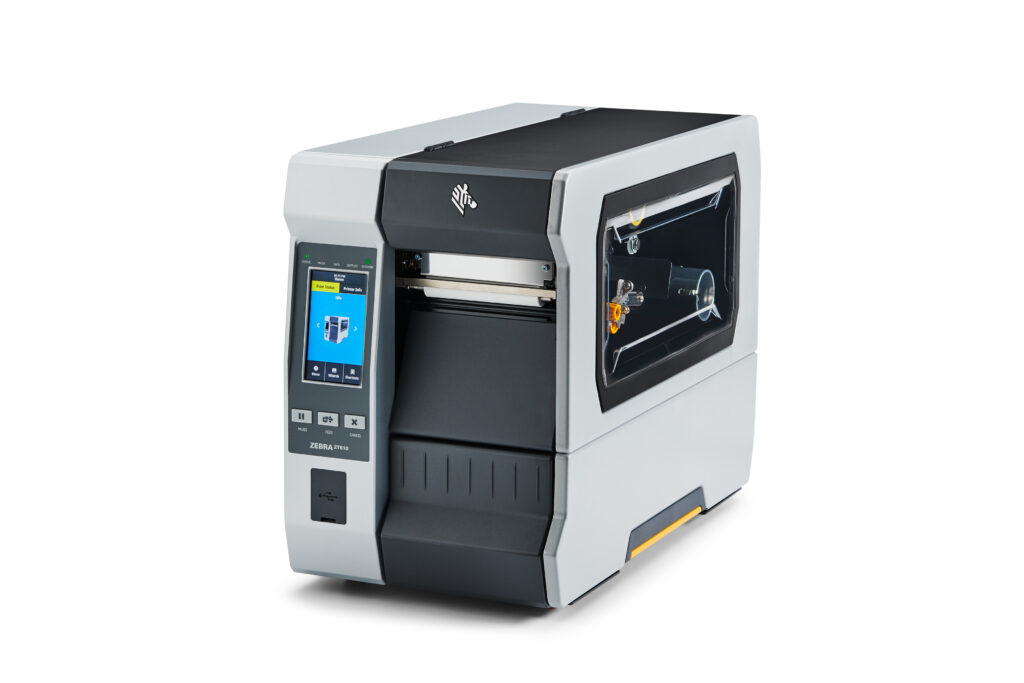
Zebra ZT610 Industrial Label Printer: Built for Demanding Labeling Applications


What Can We Help You With?
Zebra ZT610 Specifications at a Glance
| Printer Type | Industrial |
| Print Methods | Thermal Transfer / Direct Thermal |
| Print Resolutions | 203 dpi, 300 dpi, 600 dpi |
| Maximum Print Width | 4.09 in. / 104 mm |
| Maximum Print Speed | Up to 14 ips / 356 mm per second |
| Media Width | 0.79–4.5 in. / 20–114 mm |
| Micro Label Media Width | 0.47–4.5 in. / 12–114 mm |
| Maximum Media Roll | 8 in. O.D. on 3 in. core |
| Standard Ribbon Length | 1,476 ft. / 450 m |
| Ribbon Core | 1 in. |
| Memory | 1 GB RAM / 2 GB onboard Flash |
| Display | 4.3 in. full-color touchscreen |
| Standard Connectivity | USB 2.0, Serial, Gigabit Ethernet, Bluetooth |
| RFID | Optional UHF RFID |
| Construction | Industrial metal frame |
These specifications tell us what the printer can do. The more important question is whether those capabilities match what you need the printer to do.
What Is the Zebra ZT610?
The Zebra ZT610 is a heavy-duty 4-inch industrial barcode label printer engineered for high-volume and mission-critical printing.
Zebra designed the ZT610 Series as the next generation of its Xi Series industrial printers. The ZT610 uses heavy-gauge, all-metal structural components and is designed for continuous 24/7 operation.
Its built-in thermal management system eliminates cooling vents and fans, helping prevent dust and debris from entering the printer.
That makes the ZT610 particularly well suited for challenging environments such as manufacturing facilities, warehouses, distribution centers, shipping and receiving operations, electronics manufacturing, healthcare, laboratories, and automated production systems.
When printer downtime can slow production or prevent a shipment from leaving the building, industrial construction matters more than simply comparing printer speeds.
Zebra ZT610 203 vs. 300 vs. 600 DPI
One of the biggest advantages of the Zebra ZT610 is the ability to choose from 203 dpi, 300 dpi, or 600 dpi print resolution.
But higher resolution isn’t automatically better. The right resolution depends on what you’re printing.
203 DPI — High-Volume General Labeling
203 dpi is an excellent choice for many standard industrial labeling applications, including shipping labels, receiving labels, pallet labels, case labels, product identification, work-in-process labels, and larger barcodes and text.
It also allows the ZT610 to reach its maximum print speed of up to 14 inches per second.
300 DPI — Greater Detail
A 300 dpi ZT610 may be a better choice when you’re printing smaller barcodes, smaller text, detailed graphics, product identification labels, compliance labels, or smaller label formats.
For many industrial applications, 300 dpi provides an excellent balance between print quality and production speed.
600 DPI — Extremely Fine Printing
The Zebra ZT610 is also available in 600 dpi, making it suitable for extremely small text, high-density barcodes, compact labels, electronics identification, laboratory labels, and other applications requiring very fine print.
Before paying for 600 dpi, however, make sure your application actually requires it. PaladinID can help evaluate the label size, barcode dimensions, print quality requirements, material, and production speed to determine the appropriate resolution.
Zebra ZT610 600 DPI Micro Label Printer
For extremely small labels, Zebra offers a specialized ZT610 600 dpi Micro Label Printer.
According to Zebra, this version provides up to 50% more precise registration compared with a standard ZT610 600 dpi printer and can print labels as small as 3 mm.
The Micro Label version supports media widths beginning at approximately 0.47 inches / 12 mm, making it particularly interesting for electronic components, circuit board identification, small product labels, laboratory samples, healthcare applications, high-density barcode labels, and automated labeling systems.
For companies struggling to consistently register very small labels, this could be one of the most important ZT610 options to evaluate.
One important consideration: Zebra specifies that the Micro Label configuration does not support the cutter or RFID options.
How Fast Is the Zebra ZT610?
The Zebra ZT610 can print at speeds of up to 14 inches per second at 203 dpi.
That’s impressive, but maximum printer speed isn’t always the goal.
Print quality depends on several factors working together, including label material, thermal transfer ribbon, print resolution, printhead temperature, barcode design, print speed, and printer condition.
For example, slowing a printer down may improve barcode quality or ribbon transfer on certain materials.
The objective isn’t necessarily to make the printer run as fast as possible. The objective is to produce a consistently readable, durable label at the production speed your operation requires.
What Labels Work With the Zebra ZT610?
The ZT610 supports a wide variety of label materials because it can operate in both direct thermal and thermal transfer modes.
- Direct thermal paper
- Direct thermal synthetic labels
- Thermal transfer paper
- Polypropylene labels
- Polyester labels
- Durable synthetic materials
- Removable labels
- Permanent adhesive labels
- Aggressive adhesive labels
- All-temperature labels
- Specialty application materials
The ZT610 accommodates media up to 4.5 inches wide, with a maximum print width of 4.09 inches.
But label size is only one part of selecting the right Zebra ZT610 labels. You also need to consider the surface you’re labeling, application temperature, service temperature, moisture, chemicals, abrasion, outdoor exposure, required label life, and adhesive performance.
That’s why PaladinID approaches label selection by working backward from the application.
What Ribbon Does the Zebra ZT610 Use?
For thermal transfer printing, the Zebra ZT610 uses ribbons up to 1,476 feet / 450 meters long on a 1-inch core.
The correct ribbon formulation depends primarily on the label material and durability requirements.
Wax Ribbons
Wax thermal transfer ribbons are typically used with paper labels where economical, high-quality barcode and text printing is required.
Wax/Resin Ribbons
Wax/resin ribbons provide greater abrasion and smear resistance and can be an excellent choice for coated papers and compatible synthetic materials.
Resin Ribbons
Full resin ribbons are generally used with compatible synthetic labels when the printed image must withstand demanding conditions such as chemicals, moisture, abrasion, or environmental exposure.
Simply buying a ribbon that physically fits a ZT610 doesn’t mean it’s the right ribbon. The label material and ribbon need to work together.
Matching the ribbon formulation to the facestock and application can improve print quality, barcode readability, durability, and printhead life. PaladinID stocks a broad selection of thermal transfer ribbons and can help match the correct ribbon to your ZT610 label material and application.
Zebra ZT610 RFID Label Printing and Encoding
For applications requiring more than a printed barcode, the ZT610 can also be configured for UHF RFID label printing and encoding.
- UHF EPC Gen 2 V2.1
- ISO/IEC 18000-63
- RAIN RFID protocols
Zebra’s Adaptive Encoding Technology automatically selects optimum encoding settings.
RFID can be valuable for applications involving asset tracking, inventory management, work-in-process tracking, manufacturing, supply-chain visibility, shipping and receiving, and product traceability.
But RFID shouldn’t be added simply because the technology is available. The better question is: What problem are you trying to solve?
Sometimes a traditional barcode is the right answer. Other applications can benefit significantly from RFID. PaladinID can help evaluate both.
Built for 24/7 Industrial Label Printing
The ZT610 is designed differently from a desktop or light-industrial label printer.
Zebra uses heavy-gauge, all-metal structural components engineered for years of continuous operation. The printer’s thermal management system eliminates vents and cooling fans, helping prevent dust and debris from entering the printer.
This becomes especially important when the printer is operating on production floors, packaging lines, warehouses, distribution centers, shipping departments, or multi-shift operations.
Printer downtime doesn’t just mean repairing a printer. It can mean stopping a production line, delaying a shipment, creating a receiving bottleneck, or forcing employees to develop temporary workarounds.
For high-volume operations, reliability can be far more important than the initial purchase price.
Easier Setup, Operation and Maintenance
Industrial printers often have multiple operators working across several shifts.
The ZT610 includes a 4.3-inch full-color touchscreen along with several features designed to simplify everyday operation:
- Side-loading labels and ribbons
- Color-coded operator touch points
- Interior cabinet lighting
- Visual media paths
- Color-changing error indicators
- QR codes linking to error-specific help
- Quick-change printhead
- Simplified media sensor adjustment
Those features can reduce training requirements and help operators resolve minor problems without immediately calling maintenance or IT.
Zebra ZT610 Connectivity and Printer Management
The ZT610 includes standard connectivity such as USB 2.0, RS-232 Serial, Gigabit Ethernet, and Bluetooth.
The printer also provides two communication slots for additional connectivity options, including dual-band 802.11ax Wi-Fi and Bluetooth 5.3, parallel connectivity, Ethernet, and an applicator interface.
The ZT610 operates on Zebra’s Link-OS platform and supports Zebra DNA tools for printer configuration, security, monitoring, connectivity, and management.
This becomes particularly valuable when an organization has multiple printers spread across departments, production lines, warehouses, or facilities.
Don’t Forget the Zebra ZT610 Printhead
The printhead is one of the most important wear components in any thermal printer. Eventually, every thermal printhead wears.
Symptoms of a worn or damaged ZT610 printhead can include missing lines through printed images, faded areas, poor barcode quality, inconsistent print, or barcode scanning problems.
Before replacing a printhead, however, it’s worth evaluating the entire printing system. Excessive printhead temperature, incorrect ribbon formulation, poor label/ribbon compatibility, dirt and contamination, or improper printer settings can contribute to premature printhead wear.
PaladinID offers Genuine Zebra ZT610 replacement printheads and can help identify the correct printhead for your printer’s resolution.
Where Does the Zebra ZT610 Fit Best?
Manufacturing
Work-in-process labels, product identification, serial-number labels, package labeling, receiving labels, and production tracking.
Transportation & Logistics
Order picking and packing, shipping and receiving, cross-docking, and compliance labeling.
Retail & Distribution
Distribution center labeling and back-of-store operations.
Healthcare
Laboratory labels, blood-bank labeling, pharmacy labeling, and asset tracking.
The ZT610 is especially attractive when these applications require high print volume, industrial durability, precise barcode printing, or continuous operation.
The Printer Is Only Part of the Labeling Solution
A great printer cannot compensate for the wrong label or ribbon.
When PaladinID evaluates an industrial labeling application, we may look at:
- Label size
- Label material
- Adhesive
- Application surface
- Application temperature
- Service temperature
- Chemical exposure
- Abrasion
- Outdoor exposure
- Barcode size
- Print resolution
- Print volume
- Ribbon formulation
- Label software
- Connectivity
- RFID requirements
- Automated label application
A warehouse shipping label has very different requirements from a label being applied to a circuit board, chemical drum, frozen product, laboratory sample, tire, or outdoor asset.
The goal isn’t simply to find a printer that can print the label.
The goal is to build a labeling solution that works from the moment the label is printed through the entire life of that label.
Zebra ZT610 Frequently Asked Questions
1. What is the maximum print width of the Zebra ZT610?
The Zebra ZT610 has a maximum print width of 4.09 inches / 104 mm.
2. What resolutions are available for the Zebra ZT610?
The ZT610 is available in 203 dpi, 300 dpi, and 600 dpi configurations. The best choice depends on label size, barcode density, text size, graphics, and application requirements.
3. How fast does the Zebra ZT610 print?
The ZT610 can print at speeds of up to 14 inches per second / 356 mm per second at 203 dpi.
4. Can the Zebra ZT610 print direct thermal labels?
Yes. The ZT610 supports both direct thermal and thermal transfer printing. Direct thermal printing doesn’t require a ribbon, while thermal transfer printing uses a ribbon to transfer the printed image onto the label material.
5. What size labels can a Zebra ZT610 use?
The standard ZT610 supports media from approximately 0.79 inches to 4.5 inches wide. The specialized 600 dpi Micro Label version supports media beginning at approximately 0.47 inches wide.
6. What ribbon does a Zebra ZT610 use?
The ZT610 accepts thermal transfer ribbons up to 1,476 feet / 450 meters long on a 1-inch core. Depending on the label material and application, wax, wax/resin, or resin ribbon formulations may be appropriate. PaladinID can help you select the right thermal transfer ribbon for your application.
7. Does the Zebra ZT610 support RFID?
Yes. The ZT610 can be configured with optional UHF RFID printing and encoding capabilities. The specialized ZT610 600 dpi Micro Label configuration does not support RFID.
8. What is the Zebra ZT610 Micro Label Printer?
The Micro Label Printer is a specialized 600 dpi ZT610 designed for extremely small labels and high-precision registration. Zebra states that it provides up to 50% more precise registration compared with a standard ZT610 600 dpi printer and can print labels as small as 3 mm.
9. When should I choose 600 dpi instead of 300 dpi?
600 dpi is most useful for applications involving extremely small text, compact barcodes, very small labels, electronics identification, laboratory labels, or other applications requiring extremely fine print. For many industrial labeling applications, 203 or 300 dpi may be more appropriate.
10. How do I know which Zebra ZT610 configuration I need?
Start with the application rather than the printer. Consider your label size, print volume, barcode dimensions, required resolution, label material, adhesive, environmental exposure, ribbon requirements, connectivity, RFID needs, and whether the printer will be integrated with an automated labeling system.
If you’re unsure, PaladinID can help you work backward from the application to determine the right configuration.
Is the Zebra ZT610 the Right Label Printer for You?
The Zebra ZT610 Industrial Label Printer is an excellent choice for demanding 4-inch industrial labeling applications requiring high print volumes, fast print speeds, rugged construction, high-resolution printing, advanced connectivity, or RFID capabilities.
But it’s not automatically the right printer for every application.
You may need a smaller printer, a wider industrial printer, color inkjet printing, mobile printing, RFID, print-and-apply automation, or another labeling technology entirely.
That’s why we start with one simple question: What are you trying to accomplish?
Then we work backward to determine the right printer, labels, ribbons, software, and technology.
Let’s Talk!
At PaladinID, we understand that every labeling application is different.
That’s why companies across the country trust us to help them identify the right solution for their business. With over 40 years of experience and one of the industry’s largest selections of labeling products, we make it easy to find the right fit for your operation. Whether you need stock products or a custom-built solution, our team is ready to help. Visit our online catalog, Email us, or call us today at 888.972.5234.
PaladinID delivers label solutions that stick!

Got Labeling Questions? Our AI Assistant Has Answers - Chat Now!
For more information on PaladinID
Get Help With Your Next Label Project
We have over 35 years of providing exceptional service and labeling products to the world. Take the first step to an easy, stress-free solution for your label needs by contacting us.
Schedule a call below or email [email protected]
Make Your Mark
“Making companies more competitive by offering the correct label printing solution, on time, within budget, while creating unmatched value”.
About PaladinID, LLC
PaladinID develops and supports high-performance barcode labeling applications. We work with our clients to “Make Your Mark” by providing the expertise and tools necessary to create an entire product label printing solution. Located in central New Hampshire, PaladinID has been serving Massachusetts, Vermont, Maine, Connecticut, Rhode Island, New England, and beyond for over 30 years, and in 2017, became an RFID-certified company. We look forward to working with you.
You may be interested in our other services:
Product Labels
Product Labels
Labels for every type of application: Blank, Pre-printed, Variable data
Label Printers
Label Printers
We sell and support: Direct/thermal transfer, Inkjet, Laser
Printer Ribbons
Printer Ribbons
We sell ribbons for ALL barcode printers including: Zebra, Datamax, Sato, Intermec
Flexible Packaging
Flexible Packaging
We offer a wide variety of packaging containers for your products.
Label Software
Label Software
Software for all barcode printing and product labeling.
Label applicators
Label Applicators
Wide selection of applicators: Desktop/Mobile, Applicator only, Print & apply
